Connected where the let needs it. LetCompliance integrations for UK landlords and agents
LetCompliance sends Making Tax Digital updates to HMRC, collects rent through Stripe, reads bank statements and spreadsheets, and fills your calendar. From £7.99 a month for UK landlords.
No card to start.

Recognised by HMRC for Making Tax Digital on paid landlord plans. Ref. D3V9KL. See the GOV.UK listing (opens in a new tab)

Tom’s day, connected. What it connects to, one connection at a time.
0:43, with captions
Sample account
What each connection saves. What each connection saves a landlord
Before Figures copied into a second tool, just to reach HMRC.
Quarterly updates sent to HMRC from your own records.
Now Connect HMRC once on a paid plan, and each quarterly update for your UK property income is worked out from your records and sent under your own Government Gateway account.
Making Tax Digital for landlords
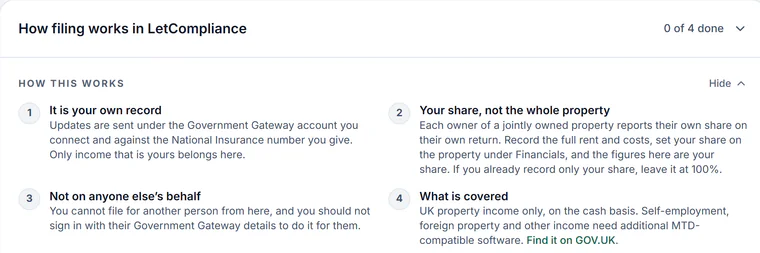
Sample account with made-up details, 18 Oct 2026 Before Standing orders checked against the bank, late ones chased by hand.
Rent collected through Stripe, into your own account.
Now Connect Stripe once and each tenant authorises a Direct Debit from a link. Rent is collected each rent day and paid out to your bank; a card payment link covers one-offs.
Rent collection by Direct Debit

Sample account with made-up details, 17 and 21 Oct 2026 Before Each month’s rent typed into the accounts software by hand.
Books in Xero?
Now On a paid landlord plan, each rent charge goes to your own Xero as a sales invoice, and the payments you record can follow it. One way, rent only.
Before A printed bank statement, ticked off line by line.
Bank statements matched, not typed.
Now Upload a CSV statement and each line is matched to a rent, a recorded cost or a new entry, with rules for regular payees. Nothing is recorded until you confirm it.
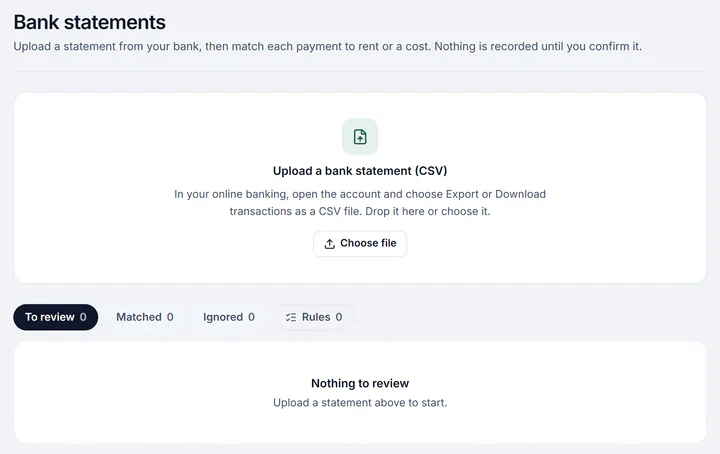
Sample account with made-up details, 18 Oct 2026 Before Every home and tenancy typed in again, one by one.
Your homes brought in from a spreadsheet.
Now Properties, tenants, HMO rooms, rents and certificate dates read from Excel or CSV, checked before saving. Import the sheet again to update it.
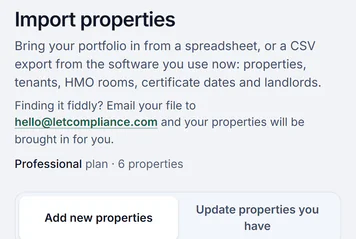
Sample account with made-up details, 18 Oct 2026


Every connection, and the plan it is on. Integrations for UK landlords, plan by plan
Each comes with its plan, at no charge of its own. Stripe takes its own fee on each payment it collects.
Making Tax Digital with HMRC
Quarterly updates for your UK property income sent to HMRC from your own records, and the final declaration when UK property is the only income to add.
Every paid landlord plan, not the trial.
Direct Debit through Stripe
Rent collected by Bacs Direct Debit on each rent day, into your own Stripe account or the agency’s.
Trial and paid plans, and agency plans.
Card payments through Stripe
A one-off card payment link for rent, and holding deposits paid by card, each into your own Stripe account.
Trial and paid landlord plans.
Bank statements
A CSV statement from your bank, each line matched to a rent or a cost for you to confirm.
Trial and paid plans.
Excel and CSV import
Properties, tenants and rents from a spreadsheet, and past income and costs from a CSV, each checked before saving.
Every plan for properties. Trial and paid plans for income and costs.
Google, Apple and Outlook calendars
Every key date in your own calendar from one private link, with alarms and no tenant’s contact details.
Every plan.
E-signing, built in
Agreements and other documents signed online with an audit certificate, and no signing service to pay for.
Trial and paid plans.
Text messages
Reminders to you by text before a date, and texts to tenants from a monthly allowance in each paid plan.
Every paid plan, not the trial.
Google sign-in and passkeys
Sign in with your Google account or a passkey on your phone or laptop, and add an authenticator app for two-step sign-in.
Every plan.
In the background: each certificate’s dates read from the file for you to check, with a reminder before each runs out. How certificate dates are kept
Everything else it reads or sends. Exports, links and public records, plan by plan
- Rent invoices and payments sent to your own Xero, on every paid landlord plan, not in the trial
- Finance also exports a Xero-ready CSV of your income and costs
- Your accountant’s read-only link: the SA105 figures, the ledger and the receipts, with CSV and PDF downloads, on every plan
- Reports emailed on a schedule, weekly, monthly or each tax quarter, to you and to your accountant once they confirm, on trial and paid plans
- Contractors accept, update and invoice a job from one private link, with no login
- The tenant portal: one link per tenant, with no app and no password, on every plan
- For an agency: landlord logins with the app’s own sign-in, and a payment file the agency’s bank can take
- The EPC register: pick a home’s certificate by postcode and its band and dates are saved, for your own homes in England and Wales
- Companies House: a company tenant’s status checked on the public register, and again each night while the let runs
- HM Land Registry’s house price index: an estimate of each home’s value from its price and purchase date, on trial and paid plans
- Met Office weather warnings, and Environment Agency flood warnings in England, for each home’s postcode, on the bell and by email
- Short films of each part, played from the LetCompliance channel on YouTube (opens in a new tab)
From £7.99 a month, every connection included. What the connections cost, plan by plan
Single is £7.99 a month for one property, and every plan above it adds properties, never a charge for a connection.
Single
For 1 property, with the whole let on it.
£7.99 a month
£63.92 billed yearly
Solo
Up to three properties, with the whole let on each.
£14.99 a month
£119.92 billed yearly
Portfolio
Up to ten properties, with the portfolio tools: the properties table and bulk actions.
£19 a month
£152 billed yearly
Portfolio Plus
For 11 to 20 properties, with everything Portfolio has.
£29 a month
£232 billed yearly
Professional
Any number of properties, up to three read-only team seats and priority support.
£49 a month
£392 billed yearly
Rent collected by Direct Debit goes into your own Stripe account. No commission is taken on the rent. Stripe charges 1% of each Direct Debit payment with a 20p minimum and a £4 cap, and £5 for a disputed payment.
Making Tax Digital is on every paid landlord plan, not the trial.
Letting agencies: agency plans from £24 a month, with every seat and branch included.
Every new landlord account starts with a 3-day trial and no card.
Integrations, the questions landlords ask. HMRC, Stripe, the bank, accounting software and signing in
Does LetCompliance work with Xero?
Yes, one way, on every paid landlord plan (not the free plan or the trial). In Settings, Integrations, connect your own Xero organisation, then choose the properties, the income account for rent and the date to send rent due from. Each rent charge from that date goes to Xero as a sales invoice, to a contact for each tenant. Choose a Xero bank account as well, and each payment you record in LetCompliance on rent without VAT is added to its invoice there. Rent goes every hour, or at once with Send now. Only rent is sent: no expenses or bills, and nothing is read back from Xero. Xero is connected from your own landlord account, not from an agency workspace.
Does LetCompliance connect to my bank?
Bank lines come in from a statement: download a CSV from your bank and upload it, and each line is matched to a rent, a recorded cost or a new entry for you to confirm. Payee rules remember the regular ones. Bank statements are on trial and paid plans.
Is LetCompliance recognised by HMRC?
Yes. LetCompliance is recognised by HMRC for Making Tax Digital, as software for a landlord’s own UK property income, and is listed on GOV.UK. The quarterly updates go from your own HMRC connection on every paid plan, not the trial.
Can I send my figures to QuickBooks or Sage?
Not directly. Finance exports your entries as a CSV, with the SA105 figures and every receipt in one PDF, and your accountant can open the same figures from a read-only link with no login.
Which calendars does the calendar link work with?
Google, Apple and Outlook calendars, from one private link in Settings. Certificates, deposit deadlines, rent days, tenancy ends, inspections, viewings and the other key dates arrive with alarms, and no tenant’s contact details are in it.
Do tenants or contractors need an account?
No. A tenant opens their portal from a link, and a contractor opens their jobs from a link, with no account and no password for either.
Does any connection cost extra?
No. Each connection comes with the plan it is on. Stripe takes its own fee on each payment it collects, and referencing is paid per check. Texts to tenants come from a monthly allowance in each paid plan.
Can I sign in with Google?
Yes. Sign in with your Google account, a passkey or an email and password, and add an authenticator app in Settings for two-step sign-in.
Can I bring my records from another landlord software?
Yes, through a spreadsheet: export the properties and tenants from the old software as an Excel or CSV file and import it, one row per tenant, checked before anything is saved. On a paid plan you can email the export to hello@letcompliance.com instead, and LetCompliance imports the properties and tenants for you, included in the plan.
Can I try the connections first?
Every new landlord account gets 3 days with no card, with Stripe, the bank statements, the calendar and e-signing open. Making Tax Digital and texts open on a paid plan, and no VAT is added to any plan.
Every connection, in depth. What each LetCompliance integration does, and its plan
Each connection in one row: what it does and the plan it is on. Each has its own page or help answer, listed under the table.
Each connection, plan by plan
Every connection below is live today. A plan named "paid" means Single and up, not the trial.
| Connection | What it does | Plan |
|---|---|---|
| Making Tax Digital with HMRC | Quarterly updates for UK property income, and the final declaration when UK property is the only income to add | Every paid landlord plan, not the trial |
| Direct Debit through Stripe | Rent collected on each rent day into your own Stripe account, or the agency’s | Trial and paid plans, and agency plans |
| Card payments through Stripe | A one-off card link for a rent, and a holding deposit paid by card | Trial and paid landlord plans |
| Bank statements | A CSV statement matched line by line to rents and costs | Trial and paid plans |
| Excel and CSV import | Properties, tenants and rents from a spreadsheet; past income and costs from a CSV | Every plan for properties; trial and paid plans for income and costs |
| Calendars | Every key date in Google, Apple or Outlook calendar, with alarms | Every plan |
| E-signing | Documents signed online, each with an audit certificate | Trial and paid plans |
| Text messages | Reminders to you by text before a date, and texts to tenants from a monthly allowance in each paid plan | Every paid plan, not the trial |
| Google sign-in | Sign in with a Google account, with two-step sign-in by authenticator app | Every plan |
| Accountant link | The figures, the ledger and the receipts, read only, with no login | Every plan |
Where each connection is explained
Each page or answer below takes one connection step by step.
- Making Tax Digital for landlords: who has to join, and the updates sent from your records.
- Rent collection by Direct Debit: setting up payouts, and what Stripe charges.
- Landlord accounting software: the books the bank statements and receipts feed.
- Connecting to HMRC: the one-time connection, step by step.
- Past income and costs from a spreadsheet: each category mapped once to its tax box.
- Resetting the calendar link: if the link was ever shared by mistake.
Connect what the let runs on.
Bring your homes in, set up payouts, add your calendar and, on a paid plan, connect HMRC once.
Connect it all in an evening
- Bring your homes in Import a spreadsheet, Excel or CSV, or add each home with its tenancy.
- Set up payouts Connect a Stripe account in Settings, then send each tenant their Direct Debit link.
- Add your calendar Copy your private calendar link from Settings into Google, Apple or Outlook.
- Connect HMRC On a paid plan, connect your HMRC account once from Making Tax Digital, and the quarterly updates go from your records.

