The books, kept as the rent comes in. Landlord accounting software for UK landlords
LetCompliance keeps each property’s books: rent posted when paid, costs from receipts and bank statements, the SA105 figures and Making Tax Digital. For UK landlords on every paid plan, from £7.99 a month.
No card to start.

Recognised by HMRC for Making Tax Digital on paid landlord plans. Ref. D3V9KL. See the GOV.UK listing (opens in a new tab)

Tom’s books. From a shoebox of receipts to books ready for tax.
0:58, with captions
Sample account
From the rent to the tax return, in four steps. How landlord accounting software keeps the books
Each step reads the records the one before it made, so nothing is typed twice.
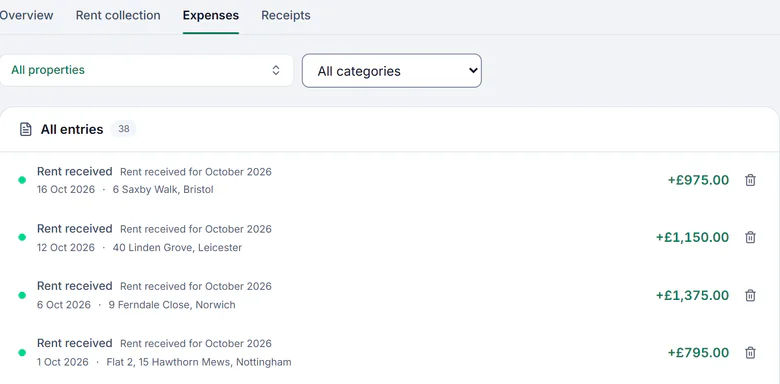
Rent posts as it is paid
Mark a rent received, or let the Direct Debit collect it, and it is posted to Finance as rent received on its property and its date.
Sample account with made-up details, 18 Oct 2026 Costs come from a photo or a statement
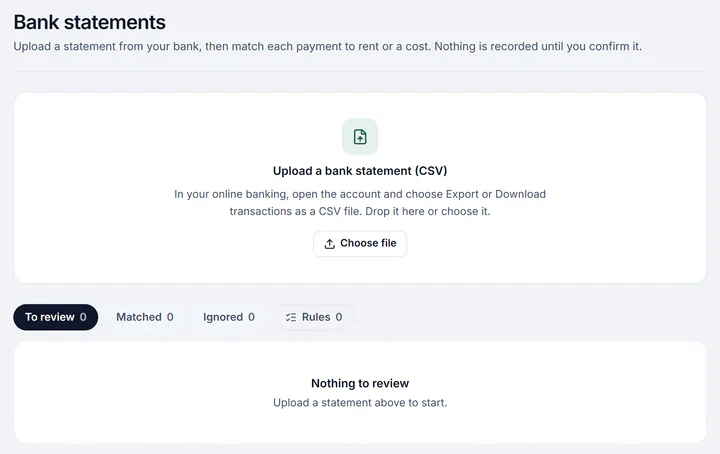
Photograph a receipt and it is read into a draft, or upload a CSV bank statement and each line is matched to a rent or a cost. Nothing counts until you confirm it.
Sample account with made-up details, 18 Oct 2026 Each cost lands in its tax box
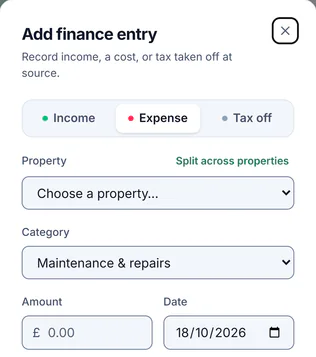
Every category maps to its box on the SA105, a bill can be split across homes, and mortgage interest is kept apart as a finance cost.
Sample account with made-up details, 18 Oct 2026 The year is ready for HMRC and your accountant
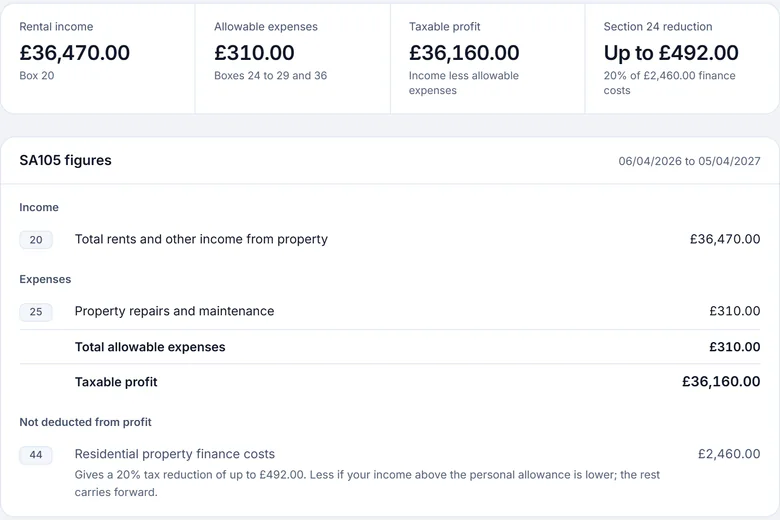
On every paid plan the tax pack gives the SA105 figures and the quarterly updates go to HMRC; on every plan your accountant can open the same figures from a read-only link.
Sample account with made-up details, 18 Oct 2026


Finance, receipt reading and bank statement import come with the 3-day trial and every paid plan; the tax pack and Making Tax Digital are on every paid plan, not the trial.
What the books stop costing you. What landlord accounting software changes at tax time
1 record of each rent and cost. The tax pack, the quarterly updates and your accountant’s link all read the same confirmed entries, so nothing is copied from one to another.
Before Typing rent into a spreadsheet each month
Now Rent marked paid, or collected by Direct Debit, is posted to Finance as income on its property and its date by itself.
Before A carrier bag of receipts in January
Now Photograph a receipt and its supplier, amount and date are read into a draft for you to confirm, or match the costs straight from a bank statement.
Before Copying figures into another tool for HMRC
Now On every paid plan the quarterly updates are worked out from the confirmed entries and sent from your own HMRC connection.
Everything it does. Landlord accounting software, feature by feature
- Income and costs by property, on the UK tax year from 6 April to 5 April
- Rent marked paid, or collected by Direct Debit, posted as income by itself
- Receipts read from a photo or a PDF into a draft, counted only once you confirm it
- Bank statements imported as a CSV, each line matched to a rent or a cost, with rules for the payees you see every month
- Past income and costs brought in from a spreadsheet saved as CSV, each category mapped once to its tax box
- A cost that repeats opened as a draft each period
- One bill split across several homes, equally, by percentage or by amount, the parts adding up to the bill to the penny
- Every category mapped to its box on the SA105, the property pages of the tax return
- Mortgage interest kept apart as a finance cost, for the Section 24 tax reduction
- A jointly owned home at your share, and a home held in a company left out of your personal figures
- The tax pack with your SA105 figures and property losses carried forward, on every paid plan
- Making Tax Digital quarterly updates sent to HMRC, and the final declaration when UK property is the only income to add, on every paid plan
- An estimate of the tax to put aside so far this year, from your own figures and the rate you choose, on every paid plan
- The mileage log at HMRC’s simplified rates, on every paid plan
- A record of a sale: the gain before reliefs, line by line
- The next 90 days: the rent expected in and the known costs out
- Rent invoices and payments sent to your own Xero, on every paid landlord plan, not in the trial
- Finance exports: a CSV, one laid out for Xero, the SA105 figures and every receipt in one PDF
- Reports emailed on a schedule to you and your accountant, on trial and paid plans
- Your own reports, rows by category, home, supplier, month or tax quarter, saved as a PDF or CSV
- A budget for each home or the portfolio, month by month, with budget against actual
- Tenants shown as Tenant 1, Tenant 2 on a report you send, when you choose
- A short AI summary of your reports on request, every figure checked against the page, never put in a file or an email
- A read-only link for your accountant, on every plan: accountant access
The accounts are one part of the let. The rest is in the same login. How the accounts hand work to the rest of the let
Expense tracking
The receipts, the bank lines, the repeating costs and the duplicates flagged before they count, in full on their own page.
Making Tax Digital
The quarterly updates come from the same confirmed entries, in HMRC’s categories, sent from your own HMRC connection on every paid plan.
Your accountant
On every plan, a read-only link to the figures, the ledger and the receipts for any of six tax years, with no account to set up.
From £7.99 a month, with Making Tax Digital on every paid plan. What the accounts cost, plan by plan
Finance, receipt reading and bank statement import come with the 3-day trial and every paid plan. The tax pack, the Section 24 calculator, the mileage log and Making Tax Digital are on every paid plan, not the trial.
Landlord accounting, the questions landlords ask. What it covers, Making Tax Digital, the bank and your accountant
What does landlord accounting software do?
It keeps each property’s income and costs on the UK tax year, in the categories of the property pages of your tax return (SA105). LetCompliance posts rent as income when it is paid, reads costs from receipts and bank statements, and gives the SA105 figures and the Making Tax Digital quarterly updates from the same entries.
Is LetCompliance full accounting software?
No. It is bookkeeping and tax for landlords: income and costs by property, the SA105 figures, Section 24 and Making Tax Digital for UK property income. It is not double-entry accounting: there is no general ledger, no balance sheet, no VAT return and no payroll.
Does it do Making Tax Digital for landlords?
Yes, on every paid plan, not the trial. LetCompliance is recognised by HMRC for Making Tax Digital as software for your own UK property income: the quarterly updates are worked out from your confirmed entries and sent from your own HMRC connection, and the final declaration too when UK property is the only income to add. It does not cover self-employment or foreign property income.
Does LetCompliance work with Xero?
Yes, one way, on every paid landlord plan (not the free plan or the trial). In Settings, Integrations, connect your own Xero organisation, then choose the properties, the income account for rent and the date to send rent due from. Each rent charge from that date goes to Xero as a sales invoice, to a contact for each tenant. Choose a Xero bank account as well, and each payment you record in LetCompliance on rent without VAT is added to its invoice there. Rent goes every hour, or at once with Send now. Only rent is sent: no expenses or bills, and nothing is read back from Xero. Xero is connected from your own landlord account, not from an agency workspace.
Can I import my bank statements?
Yes. Download a statement from your bank as a CSV and upload it, and each line is matched to a rent, a cost already recorded or a new entry for you to confirm. Payee rules remember the ones you see every month, Stripe payouts are recognised, and nothing is recorded until you confirm it.
Can it read my receipts?
Yes. Photograph a receipt, or choose several at once, and the supplier, amount, date and category are read into a draft expense for you to check. It counts in your figures only once you confirm it.
How does it handle mortgage interest and Section 24?
Mortgage interest and other finance costs on homes are kept apart from the costs, because they are not deducted from rental income: they give a tax reduction instead. The tax pack shows them in their own box with the reduction, and the Section 24 calculator works through your own figures on every paid plan.
Can my accountant see my figures?
Yes, on every plan. Send them a read-only link and they open the SA105 figures, every confirmed entry with its receipts and the Making Tax Digital updates sent, for any of six tax years, with CSV and PDF downloads and nothing they can change.
Can I build my own reports?
Yes, on the trial and every paid plan. Choose what each row is, a category, a home, a supplier, a month or a tax quarter, and split the columns by month, quarter, home or category. Save it, download it as a PDF or CSV, or have it emailed on a schedule. Its totals agree with Finance to the penny.
Can I set a budget for each property?
Yes, on the trial and every paid plan. Set the income and costs you expect for each home, or the whole portfolio, month by month on the tax year, or start from last year’s figures in one press. Budget against actual shows each line over or under. A budget never changes a figure on your tax return.
What about a home I own jointly or through a company?
A jointly owned home counts at your share in the tax figures. A home marked as held in a company, or as not in your tax return, is left out of every personal tax figure but stays in the rent, Finance and the reports.
Do I still need an accountant?
Not to keep the records or send the quarterly updates: on a paid plan LetCompliance does both from your own figures, and sends the final declaration when UK property is the only income to add. An accountant can still check the year or file the return for you, from a read-only link to the same figures.
How much does landlord accounting software cost?
Single is £7.99 a month for one property, Solo £14.99 for up to 3 and Portfolio £19 for up to 10, with larger plans above. Finance, receipts and bank statements come with the 3-day trial and every paid plan; the tax pack and Making Tax Digital are on every paid plan.
In depth. What landlord accounting software covers, and the tax rules behind it
What it covers, and what it does not
LetCompliance is bookkeeping and tax for landlords, by property. It is not a general accounting package, so the page says plainly where it stops.
Covered
- Income and costs for each property, on the UK tax year.
- The SA105 figures, Section 24 finance costs, property losses carried forward and the mileage log.
- Making Tax Digital for UK property income, recognised by HMRC, on every paid plan.
- Exports and a read-only link for your accountant.
Not covered
- A general ledger, double-entry bookkeeping or a balance sheet.
- VAT returns and payroll.
- Self-employment or foreign property income in Making Tax Digital.
- Filing for clients as an agent: LetCompliance is software for a landlord’s own return.

The tax rules behind the figures
What GOV.UK says about the figures the accounts prepare, each with its source.
The property pages of the tax return
UK property income goes on the supplementary pages SA105 of the SA100 tax return. Each Finance category maps to one of its boxes.
Source: GOV.UK, Self Assessment: UK property (SA105) (opens in a new tab)
Mortgage interest is not deducted from the rent
For a residential landlord, finance costs such as mortgage interest are not deducted from rental income; the relief is given as a tax reduction instead. LetCompliance keeps them apart from the costs for that reason.
Source: GOV.UK, Changes to tax relief for residential landlords: how it’s worked out (opens in a new tab)
Who has to use Making Tax Digital
Making Tax Digital for Income Tax applies from 6 April 2026 if your qualifying income was over £50,000 in 2024 to 2025, from 6 April 2027 if it was over £30,000 in 2025 to 2026 and from 6 April 2028 if it was over £20,000 in 2026 to 2027.
Source: GOV.UK, Check if you’re eligible for Making Tax Digital for Income Tax (opens in a new tab)
Qualifying income is before expenses
Qualifying income is your total income from self-employment and property before expenses, and for a home you own with someone else, your share of its income counts.
Source: GOV.UK, Work out your qualifying income for Making Tax Digital for Income Tax (opens in a new tab)
Each source was read on 20 November 2026. General information, not tax advice.
Your own reports and budgets
Every report and budget reads the confirmed entries Finance holds, so the totals agree to the penny.
Your own reports
- Rows by category, home, supplier, month or tax quarter.
- Columns for income, costs and net, or split by month, quarter, home or category.
- Only the entries, categories and homes you choose.
- Saved, downloaded as a PDF or CSV, or emailed weekly, monthly or each quarter.
Budgets
- For each home or the whole portfolio, month by month on the tax year.
- Started from last year’s figures in one press.
- Budget against actual, line by line, as a report you can schedule.
- A plan only: no figure on your tax return changes.
A short summary, on request
- On the Reports page and your year in review, written by AI when you ask.
- Every figure in it checked against the page; addresses replaced and no tenant’s details sent.
- Shown on screen only, never put in a file or an email.
Reports and budgets come with the trial and every paid plan.
Each part of the accounts, in full
This page is the accounts in one place. Each page below goes further on one part.
- Landlord expense tracking: receipts, bank lines, repeating costs and what you can claim.
- Landlord record keeping: the records to keep, and for how long.
- Making Tax Digital for landlords: who has to join, when, and the updates step by step.
- Accountant access: the read-only link, and HMRC’s own agent authorisation.
- Company and personal properties: which return each home goes on.
- Integrations: HMRC, Stripe, bank statements and spreadsheets, plan by plan.
- Property accounting software compared: the UK tools side by side, with dates.
Books that keep up with the rent.
Mark the rent, snap the receipts, upload the statement, and the figures are ready for the return. From £7.99 a month.

