Recognised by HMRC for UK property income
Making Tax Digital for landlords. From £7.99 a month.
MTD software recognised by HMRC. Your quarterly updates go to HMRC straight from your rent and expenses. LetCompliance is landlord software for the whole let. For Making Tax Digital it files each receipt and rent payment in HMRC’s categories as it happens, builds every quarterly update from them and sends it to HMRC. When the year ends, you can submit your tax return here too.
Who has to use it
Landlords and sole traders whose income from property and self-employment, before expenses, is over the line. The line moves down each April.
- Over £50,000Since 6 April 2026In force
- Over £30,000From 6 April 2027Next
- Over £20,000From 6 April 2028Then
HMRC goes by your tax return from two years before.
Our researchin the press
- The Telegraph (opens the article)
- Yahoo News (opens the article)
- MSN (opens the article)
- Birmingham Mail (opens the article)
- Accountancy Daily (opens the article)
- LandlordZONE (opens the article)
- Landlord Today (opens the article)
- The Negotiator (opens the article)
- PropertyWire (opens the article)
- Letting Agent Today (opens the article)
What is Making Tax Digital for landlords?
Making Tax Digital for Income Tax means keeping your rent and costs in software and sending HMRC a running update every quarter. Your tax return still follows by 31 January, and it is sent through software too.
Whether it applies depends on your qualifying income: your property and self-employment income before expenses, on the tax return from two years earlier. Over £50,000 on your 2024 to 2025 return means it applied from 6 April 2026. Over £30,000 on your 2025 to 2026 return means 6 April 2027, and over £20,000 on your 2026 to 2027 return means 6 April 2028.
LetCompliance is recognised by HMRC for Making Tax Digital for UK property income. It builds each quarterly update from the rent and costs you record, and you check it and send it to HMRC from your account, on every paid plan from £7.99 a month.
Checked against GOV.UK guidance on .
What it covers
Is LetCompliance right for you?
It is built for landlords sending their own UK property income. This is what it covers, in the same three statuses as our listing on GOV.UK.
Ready now
- UK property income, for individuals
- Digital records kept here, on the cash basis
- Quarterly updates, standard or calendar periods
- HMRC’s tax calculation, during and after the year
- Year-end allowances and adjustments
- Your tax return, and amending it
- Jointly owned property: set your share and the figures follow
In development(2)
- UK savings interest
- UK dividends
Listed on GOV.UK as in development for the 2026 to 2027 tax return.
In development
- UK savings interest
- UK dividends
Listed on GOV.UK as in development for the 2026 to 2027 tax return.
Not included(6)
- Self-employment income
- Foreign property income
- Partnership income
- Filing for clients as an agent
- Property losses from earlier years
- Capital allowances other than on a car
Not included
- Self-employment income
- Foreign property income
- Partnership income
- Filing for clients as an agent
- Property losses from earlier years
- Capital allowances other than on a car
A job or a pension as well? HMRC adds the employment and pension income it already holds to your tax return, so on their own they do not stop you submitting it here.
Need something from the other two lists? Your UK property updates can still go from here. Self-employment or foreign property updates, and a tax return that needs anything listed, go from software that covers them. LetCompliance asks before your tax return is sent. Our GOV.UK listing
Inside the account
See the rest of the let, as it looks inside
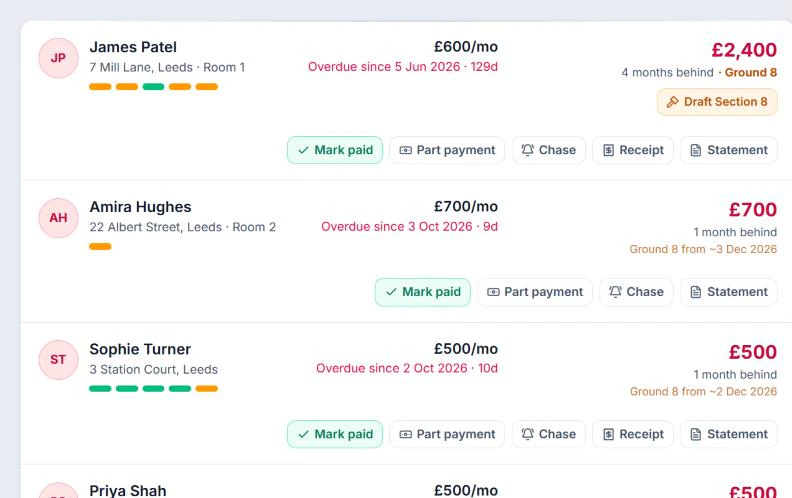
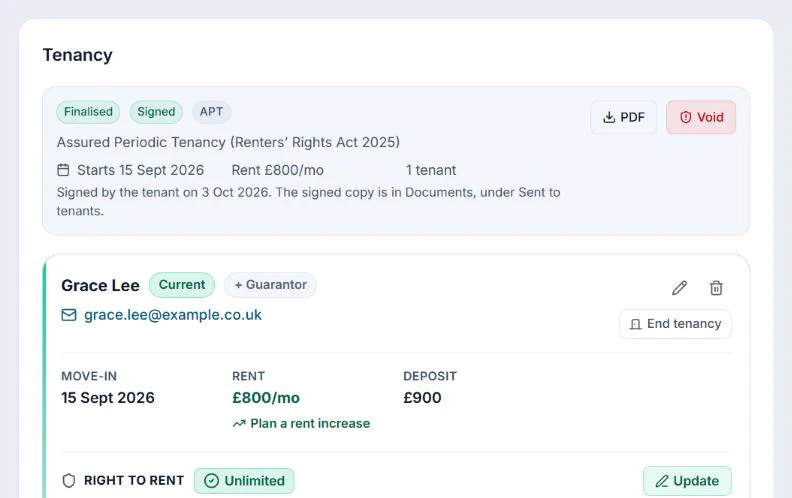
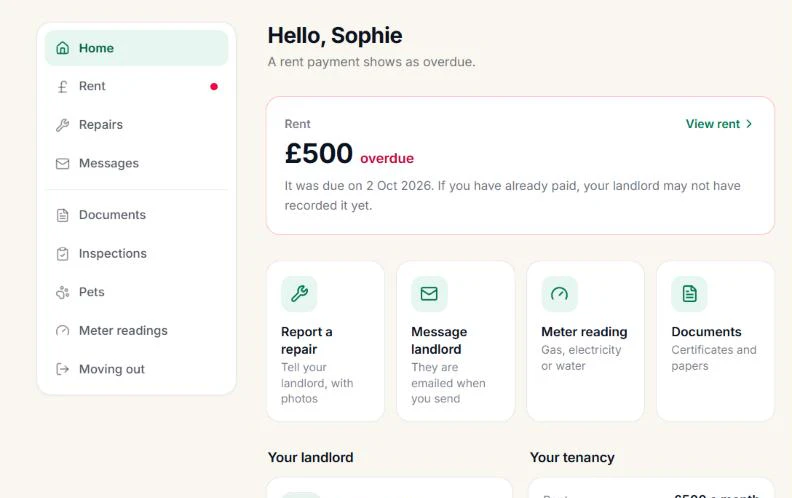
Sorted by who owes most, with the date Ground 8 would be reached if nothing more is paid.
How arrears are trackedScreens from a sample account. Names, addresses and some details changed, and some parts left out to fit.
How it works
How Making Tax Digital works, from sign-up to tax return.
Everything happens in your LetCompliance account, apart from signing up with HMRC, which you do once on GOV.UK. Every update is kept with the figures HMRC received, the date and HMRC’s reference.
- −£145.00
Boiler service
Repairs and maintenance
- £1,050.00
Rent, 12 Elm Road
Rent received
- −£9.90
Inspection visit, 18 miles
Travel costs
Once01Get set up
Before your first update
- 1
Sign up with HMRC
On GOV.UK, unless HMRC has signed you up already. You need to be registered for Self Assessment.
- 2
Connect your HMRC account
Sign in on HMRC’s own page with the Government Gateway ID you use for Self Assessment, then add your National Insurance number.
- 3
Add your properties and records
Bring in this tax year’s rent and expenses. Type them in, photograph receipts or import a bank statement.
- 4
Choose your update periods
Standard periods from 6 April, or calendar periods from 1 April.
Send Q2 update
Due 7 Nov- Income
- £12,600.00
- Allowable expenses
- £2,910.00
Received by HMRC, reference savedEvery quarter02Send your update
By 7 Aug, 7 Nov, 7 Feb and 7 May
- 1
Record as you go
Rent, receipts and journeys, each filed against its property in HMRC’s categories.
- 2
Check the quarter
When the period ends, open it on the Making Tax Digital page and check the total in each category.
- 3
Send it
HMRC confirms it, the date and HMRC’s reference are saved, and HMRC’s estimate of your tax so far appears.
- 4
Fix mistakes later
Correct the record. Updates are running totals, so the next one carries the change.
Year end, 2026 to 2027
- Property income allowance
- Finance costs brought forward
- Capital allowance on a car
Tax returnReady to submitAfter 5 April03Finish the year
By 31 January
- 1
Send the fourth update
By 7 May, like the other three.
- 2
Answer three questions
About any other income and claims. If your return needs something LetCompliance does not cover, it tells you before anything is sent.
- 3
Save your year end
Choose your expenses, the £1,000 property allowance or Rent-a-Room relief, with the profit each gives side by side, and add anything else you claim.
- 4
Submit your tax return
Ask HMRC to calculate your tax, read it and submit. You can amend the return afterwards.
Already sent an update with other software this year? LetCompliance asks HMRC what it holds, so you can switch part-way through the year.
More than one property
Making Tax Digital with more than one rental property.
One quarterly update covers all of your UK rental properties together. GOV.UK treats one or more UK properties as one UK property business, so there is one update each quarter, not one per property, and it carries only your share of a property you own jointly.
For more than one property, Solo is £14.99 a month for up to 3, Portfolio £19 for up to 10, Portfolio Plus £29 for up to 20 and Professional £49 for any number, with Making Tax Digital in each.
Do I send one quarterly update for each rental property?
No. GOV.UK says one or more properties in the UK are legally treated as one UK property business, with no separate digital records needed for each property, and your software adds the records together into one quarterly update.
LetCompliance files every rent payment and cost against its own property, so each let can still be checked on its own, and sends one update for the whole UK property business, with no property named in it. Foreign property is a separate business that GOV.UK asks to be recorded property by property, and LetCompliance does not cover it.
Do jointly owned properties go in my quarterly update?
Your share of them does: GOV.UK says you only need to create digital records for your share of the income and expenses from a jointly let property.
In LetCompliance you enter the full rent and costs, set your share on the property, and every quarterly update uses your share. The other owner sends their own share from their own HMRC account.
I own some properties personally and some in a limited company. What goes in my updates?
Only the personal ones. Making Tax Digital for Income Tax is for sole traders and landlords registered for Self Assessment, and a limited company pays Corporation Tax on its profits instead, so rent that belongs to the company stays out of your updates.
Mark a property as held in a limited company and LetCompliance leaves it out of your quarterly updates, your tax return and your SA105 figures, while it stays in your portfolio, rent and Finance like any other property.
Company and personal properties in one accountMy rents arrive weekly or on odd dates. Which quarter do they go in?
The quarter the money arrived in. Each record carries the date the income was received, and each update covers the tax year from its start to the end of the period, so a payment first appears in the update for the period its date falls in and stays in every update after it.
LetCompliance dates each rent payment on the day it was paid, weekly, fortnightly and four-weekly rents included, so on standard periods a payment on 5 July is in the first update and one on 6 July first appears in the second.
What happens to a loss on my rental properties?
All your UK lets make one profit or loss for the year, and GOV.UK says a loss can normally only be set against future profits from the same rental business, with overseas property kept separate from UK property.
On paid plans the LetCompliance tax pack carries losses forward year by year from your records, including a loss brought in from before you joined, and takes them off the next profits first. Claiming a loss from an earlier year on the tax return itself is not available in LetCompliance yet: in that year your quarterly updates still go from here, and the tax return goes from your accountant or from software that can claim it.
Give your accountant read-only accessWhat does LetCompliance send to HMRC, and what do I do at the year end?
LetCompliance sends your quarterly updates: it is recognised by HMRC for Making Tax Digital for Income Tax, as software for individuals with UK property income. After 5 April you send the fourth update by 7 May, save your year end, choosing your expenses, the £1,000 property allowance or Rent-a-Room relief, and submit your tax return by 31 January.
The tax return goes from LetCompliance when UK property is the only income you need to add yourself, because HMRC adds the employment and pension income it already holds. If the return also needs savings interest, dividends, self-employment, foreign property or partnership income, or a loss from an earlier year, LetCompliance says so before anything is sent, and the return goes from software that covers it or from your accountant.
Rules from GOV.UK’s guidance on creating digital records and sending quarterly updates (both updated 7 September 2026) and on working out rental income, read on 1 October 2026. This is not tax advice.
What it costs
On every paid plan, from £7.99 a month.
Quarterly updates, your tax return, and the income, expense, bank statement and mileage records behind them. No VAT added.
| Plan | Properties | Price |
|---|---|---|
| Single | One property | £7.99 a month |
| Solo | Up to 3 properties | £14.99 a month |
| Portfolio | Up to 10 properties | £19 a month |
| Portfolio Plus | Up to 20 properties | £29 a month |
| Professional | Unlimited properties | £49 a month |
New accounts also get a 3-day trial, no card. Making Tax Digital, the SA105 Tax Pack and the Section 24 calculator are part of the paid plans.
How that compares
What Making Tax Digital costs for one property.
Every product here is on GOV.UK’s list of software for Making Tax Digital for Income Tax. What differs is what you pay to send your updates for a single rental, and whether it can send the tax return that finishes the year.
| Software | For one property | Tax return on HMRC’s list | |
|---|---|---|---|
| LetComplianceUsSingle plan: quarterly updates, the tax return when UK property is the only income you add, rent collection and your SA105 figures. Making Tax Digital is on every paid plan | £7.99/mo | Ready now | Single plan: quarterly updates, the tax return when UK property is the only income you add, rent collection and your SA105 figures. Making Tax Digital is on every paid plan |
| AugustMTD reporting starts on the Growth plan; the free plan does not include it | From £8.99/mo | In development | MTD reporting starts on the Growth plan; the free plan does not include it |
| Landlord StudioOn the free MTD Go plan; Pro is £15/mo + VAT | £5 a submission | In development | On the free MTD Go plan; Pro is £15/mo + VAT |
| HammockBasic plan, 1 to 3 properties | From £8/mo + VAT | Ready now | Basic plan, 1 to 3 properties |
| Landlord VisionStarter, billed yearly, 60% off for two years; normally £19.97/mo | £7.99/mo + VAT | Ready now | Starter, billed yearly, 60% off for two years; normally £19.97/mo |
| FreeAgent£5/mo for the first six months; free with a NatWest, RBS or Ulster Bank business account, or Mettle | £10/mo + VAT | Ready now | £5/mo for the first six months; free with a NatWest, RBS or Ulster Bank business account, or Mettle |
Prices from each provider’s own pricing page, checked on 24 September 2026. The tax return column is HMRC’s own label on its software finder, checked on 6 October 2026: “In development” means the provider has committed to building it in time for the 2026 to 2027 return. They change, so check before you buy. HMRC does not recommend any one product. LetCompliance covers UK property income: if your return also needs self-employment, foreign property, savings or dividend income, a product that covers those may suit you better.
MTD software for landlords, comparedChoosing MTD software
MTD software for landlords: what to look for.
Four things decide whether it fits a landlord: every property in one update, expenses captured without retyping, digital records kept in the software itself, and quarterly updates sent to HMRC. LetCompliance does all four for UK property income, in the same account that runs the let.
From £7.99 a month for one property
Get startedCan MTD software handle landlords with multiple properties?
It should, in one account and one update: HMRC treats all your UK lets as one UK property business, so the software adds every property’s records into a single quarterly update.
LetCompliance keeps each let’s rent and costs against its own property, for any number of properties in one login, and builds the one update from all of them. A portfolio imports from a spreadsheet saved as CSV, and any property you mark as held in a company stays out of your update. Plans are priced by the number of properties, from £7.99 a month for one to £49 for unlimited.
How should MTD software track landlord expenses?
From the receipt or the bank statement rather than from your typing, because each expense needs its amount, the date it was paid and its category in the record.
Photograph a receipt and LetCompliance reads the supplier, date and amount and suggests the property and category for you to confirm. Bank statements import as a CSV file, and journeys go in a mileage log at HMRC’s rates. Your accountant gets a Xero-ready CSV of your rent and costs, or a read-only link to your figures, ledger and receipts with no login to set up.
What your accountant seesDoes MTD software keep the digital records, or do I need a spreadsheet?
Software that works with Making Tax Digital keeps them itself; a spreadsheet only works if it is digitally linked to bridging software that sends the updates, with nothing copied or retyped on the way.
LetCompliance keeps the records in your account, so there is no spreadsheet or bridging software in between. The rent you record, typed in or collected by Direct Debit or card, and each receipt and journey are filed against their property in HMRC’s categories as you add them.
Does the software send quarterly updates to HMRC?
It must, for the income you have, so check GOV.UK’s software finder: updates are due by 7 August, 7 November, 7 February and 7 May, and each covers the tax year so far.
LetCompliance is recognised by HMRC for Making Tax Digital for UK property income. You check each update and send it from your account, HMRC’s reference is saved with it, and when UK property is the only income you add yourself, your tax return goes from here too. Self-employment and foreign property go from software that covers them.
From £7.99 a month, with every update built from the rent and receipts already in your account.
Making Tax Digital is on every paid plan, priced by the number of properties, up to £49 a month for unlimited. The same account runs the tenancies, rent, repairs and compliance.
The tax year
The MTD tax year: four quarterly updates, then your tax return.
Each update is a running total from the start of the tax year. You send one even for a quarter with nothing in it, and your tax return follows by 31 January.
| Update | Covers | Due by |
|---|---|---|
| Q1 | 6 April to 5 July | 7 August |
| Q2 | 6 April to 5 October | 7 November |
| Q3 | 6 April to 5 January | 7 February |
| Q4 | 6 April to 5 April | 7 May |
After the year
Tax return by 31 January
Add your year-end allowances and adjustments, check HMRC’s calculation and submit your tax return.
Prefer calendar quarters?
Quarters from 1 April
Calendar update periods end on 30 June, 30 September, 31 December and 31 March. Choose them before your first update of the tax year. The deadlines stay the same.
There are no penalties for a late quarterly update in the 2026 to 2027 tax year, though all four must be sent before your tax return. After that each missed deadline, a late tax return included, is a penalty point, 4 points means a £200 penalty, and late payment has penalties of its own. Penalties on GOV.UK
Who it applies to
When Making Tax Digital starts for landlords.
HMRC looks at your qualifying income, which is self-employment and property income before expenses, on the tax return from two years earlier. Your 2024 to 2025 return decided April 2026.
In force
Over £50,000
Next
Over £30,000
Then
Over £20,000
Working out your qualifying income
- Add up your property income and any self-employment income for the tax year, before expenses. HMRC calls this your qualifying income.
- Rent counts at the gross figure. If a letting agent collects it, use the rent before the agent’s fee, because the fee is an expense.
- For a property you own with someone else, only your share counts. GOV.UK’s example: £50,000 of rent shared equally with a sibling is £25,000 of qualifying income each.
- Some income never counts: employment (PAYE) pay, your share of a partnership’s profit, dividends, the State Pension and private pensions. GOV.UK’s other example: £25,000 of rent and £27,000 of self-employment turnover make £52,000.
- If you were not UK tax resident, only your UK property income and the self-employment income on your UK return count.
Who does not have to use it
- Exempt without applying: qualifying income of £20,000 or less; no National Insurance number before the tax year starts; acting as personal representative for someone who has died (for that role only: your own rental income still counts); partnerships, which are not required to use it yet; Lloyd’s members who included the SA103L page on their 2024 to 2025 return; and people who said on their 2024 to 2025 return that they are not physically or mentally able to give HMRC information, with a power of attorney or a deputy in place.
- Until at least April 2027, without applying: if your 2024 to 2025 return claimed averaging relief on the self-employment pages, qualifying care relief, or included the trust and estates (SA107) or residence (SA109) pages.
- With no end date set yet, without applying: ministers of religion who included the SA102M page, and anyone whose 2024 to 2025 return included Married Couple’s Allowance or Blind Person’s Allowance, received or transferred.
- Apply to HMRC if you are digitally excluded: your age, health or a disability stops you using a computer, tablet or phone; your religious society’s beliefs rule out digital records and you do not use a computer, tablet or phone for business or personal use; or you have no internet access at home or work because of where you are, and nowhere suitable to use it.
- Not a reason on its own: having filed on paper before, not knowing accounting software, having few records, or the extra time and cost.
Property owned by a limited company is outside it.
HMRC’s exemption page has the full listFree checker
Does it apply to you, and from which April?
Put in your rent and any self-employment turnover. You get your start date and every quarterly deadline for that year.
Check my dateFree reminder
Remind me before 6 April 2027
The £30,000 band starts then, decided from the return due on 31 January 2027. Two emails and no more: one in February, once that return is in, and one in late March.
One address, used for this reminder only. Unsubscribe in one click.

The person behind it
Built by a landlord, for landlords.
I let property myself, so I know what it costs to juggle an agent, a spreadsheet and a handful of reminder apps just to run a let. LetCompliance puts all of it behind one login: advertise the property, take applications, collect the rent by Direct Debit, run the repairs and send the tax updates to HMRC, with every certificate and notice kept in order, each taken straight from GOV.UK.
Questions
Questions landlords ask about Making Tax Digital.
Something not covered here? Ask us.
Start with this quarter.
Add your properties and this year’s rent and expenses, then choose a plan, from £7.99 a month, and connect HMRC. Your next update is ready to check and send before it is due.
Last reviewed 16 October 2026
The rules
Do I need to use Making Tax Digital for Income Tax?
You do if you are a sole trader or landlord whose qualifying income is over £50,000 on your 2024 to 2025 tax return (from 6 April 2026), over £30,000 on your 2025 to 2026 return (from 6 April 2027), or over £20,000 on your 2026 to 2027 return (from 6 April 2028). Qualifying income is your self-employment and property income before expenses, and for jointly owned property only your share counts. GOV.UK’s guidance “Find out if and when you need to use Making Tax Digital for Income Tax” explains the exemptions.
Does Making Tax Digital apply if I only let one property?
It depends on income, not on the number of properties. One property you own alone, with rent over £30,000 on your 2025 to 2026 return, brings you in from 6 April 2027. If you own it with someone else, only your share counts.
Does the letting agent’s fee come off my qualifying income?
No. Qualifying income is counted before expenses, and the agent’s fee is an expense, so HMRC looks at the full rent the agent collected. Record the full rent as income and the fee as a cost. Using an agent does not move Making Tax Digital off you: the obligation is still yours.
MTD if you use a letting agentDo I have to sign up?
HMRC is signing up people who need to use Making Tax Digital for Income Tax and writing to them, but it asks you to check even if no letter arrives. You can also sign up yourself on GOV.UK. You need to be registered for Self Assessment and to have filed a return in the last 2 years, and you should choose your software before you sign up.
What are the quarterly update deadlines?
On standard update periods the updates cover 6 April to 5 July, 5 October, 5 January and 5 April, and are due by 7 August, 7 November, 7 February and 7 May. Each update is cumulative from the start of the tax year, and you still send one if nothing came in or went out. Calendar update periods start on 1 April and end on 30 June, 30 September, 31 December and 31 March, with the same deadlines. Your tax return is due by 31 January after the tax year.
What happens if I miss a quarterly update?
There are no penalties for missing a quarterly update deadline in the 2026 to 2027 tax year, but you still need to send all four before you can submit your tax return. From 2027 to 2028, each missed quarterly deadline earns a penalty point, and so does a late tax return, including the one for 2026 to 2027. At 4 points you pay a £200 penalty, then £200 for each further missed deadline. Late payment has its own penalties: in your first year you have 30 days from the due date to pay or set up a payment plan before they start, and 15 days after that.
Does Self Assessment go away?
No. Your tax return is still your Self Assessment return, sent through software instead of HMRC’s online form. If you start Making Tax Digital in April 2026, you file your 2025 to 2026 return the usual way, and your 2026 to 2027 return is the first one sent through software, by 31 January 2028.
Can I keep using a spreadsheet?
Yes, if the spreadsheet is digitally linked to bridging software that sends the updates, with no figures copied or retyped along the way. Paper records on their own are not enough. In LetCompliance you keep the records in the account itself, so no spreadsheet or bridging software is needed.
Can I record my expenses in less detail?
If your UK property turnover is under £90,000 you can use simpler categories. A landlord with residential property still records each item as income or an expense and marks any restricted finance cost, such as mortgage interest, separately. LetCompliance files each cost in HMRC’s categories as you add it, with mortgage interest on a residential let kept as a residential finance cost.
I own a property with somebody else. What do I record?
Your share of the rent and your share of each cost. HMRC treats each owner’s share separately, so each of you keeps your own records and connects your own HMRC account. Married couples and civil partners who live together are normally taxed on an even split, unless they have told HMRC otherwise on Form 17. In LetCompliance you enter the full rent and costs and set your share on the property; your updates then use your share. If you already enter only your share, leave it at 100%.
My properties are in a limited company. Does this apply?
Not to those properties. Making Tax Digital for Income Tax is for sole traders and landlords who do Self Assessment, so rent that belongs to a company is outside it. If you also hold property personally, that income counts towards your qualifying income.
Using LetCompliance
Is LetCompliance recognised by HMRC?
Yes. LetCompliance is on GOV.UK’s list of software that works with Making Tax Digital for Income Tax, as software for individuals with UK property income: it creates your digital records, sends your quarterly updates and, when UK property is the only income you need to add yourself, submits your tax return. HMRC does not recommend any one product, and the listing shows what each covers.
Does LetCompliance send my quarterly updates to HMRC?
Yes. You connect your HMRC account once, check each update and send it from LetCompliance. Every update is kept with the figures HMRC received, the date and HMRC’s reference. Updates cover UK property income for individuals on the cash basis.
Can I file my tax return in LetCompliance?
Yes, when UK property is the only income you need to add yourself. HMRC adds information it already holds, such as employment and pension income. If you also have savings interest, dividends, self-employment, foreign property or partnership income, or need to claim property losses from an earlier year, keep sending your quarterly updates here and file your tax return with software that can add the rest. LetCompliance asks before anything is sent.
I have a job or a pension as well. Can I still submit my tax return here?
Yes, if UK property is the only income you need to add yourself. HMRC adds information it already holds to your tax return, including employment (PAYE) income, pensions and other taxable state benefits. Savings interest, dividends and partnership profits are yours to add, so a tax return with any of those is finished in software that covers them.
What do I need before I connect to HMRC?
You need to be signed up for Making Tax Digital for Income Tax, the Government Gateway ID you use for Self Assessment and your National Insurance number. Until you are signed up, HMRC refuses the connection whichever software you use.
I already sent an update with other software. Can I switch?
Yes. Once your HMRC account is connected, LetCompliance asks HMRC what it already holds for the tax year, so a quarter sent elsewhere shows as sent. Updates are running totals, so the next one you send from here covers the whole year so far.
What if I get a figure wrong?
Correct the record in LetCompliance. Each update covers the tax year to date, so the next update carries the correction without resending earlier ones. If you change a record after your last update, saving your year end sends that update again, and you can amend your tax return after submitting it.
Should I use my expenses, the £1,000 property allowance or Rent-a-Room relief?
You choose once for the year when you save your year end, and LetCompliance shows the profit each way gives side by side, worked out from your records. The property allowance and Rent-a-Room relief cannot be claimed alongside expenses. If you are unsure, GOV.UK’s guidance on working out your rental income or your accountant can help.
Cost and support
Which MTD software for landlords can send the tax return?
Every one of the 128 products HMRC lists for UK property income sends quarterly updates, but not every one shows the tax return as ready. On 6 October 2026, HMRC’s list showed it as ready now for 84 of them. LetCompliance can send it when UK property is the only income you need to add yourself.
HMRC’s list, countedIs there free MTD software for landlords?
Yes, some recognised products have a free plan, but check what it sends to HMRC: some charge for each submission and some keep Making Tax Digital for paid plans. LetCompliance’s Making Tax Digital is on every paid plan, from £7.99 a month for one property, with rent collection, your tax return figures (SA105) and mortgage interest relief (Section 24) alongside the quarterly updates and, when UK property is the only income you add yourself, your tax return. It is on GOV.UK’s list of software recognised by HMRC. GOV.UK’s software finder lists every recognised product and what it covers.
Can my accountant send my quarterly updates instead?
Yes, if they use agent software for Making Tax Digital: your accountant can sign you up and send the updates from their own software. LetCompliance is software for individuals rather than agents, so from LetCompliance you send them yourself. If your accountant sends them, they can import your records from a CSV export, which counts as a digital link, where copying and pasting figures does not. Each submission comes from one product, so agree who sends which update before the deadline.
What records do I need to keep for Making Tax Digital?
For each item of income and each expense: the amount, the date it was received or paid, and its category, using the same categories as Self Assessment. Record only your share of a jointly let property. Each record has to exist before you send the quarterly update that covers it, and if you sign up part-way through a year you catch up from the start of that tax year. You still keep the originals, such as invoices and bank statements. In LetCompliance each rent payment, receipt and journey is filed against its property in HMRC’s categories as you add it.
How much does it cost?
Making Tax Digital is on every paid plan, with the income and expense records, bank statement import and mileage log behind it. Single is £7.99 a month for one property and Solo £14.99 for up to 3, both with your tax return figures (SA105) and mortgage interest relief (Section 24). Making Tax Digital starts when you choose a plan; the 3-day trial covers the rest of the let.
Do I still need an accountant?
You do not have to have one to use Making Tax Digital. If you work with an accountant, they can review the same figures you send, and you can export your quarterly records as a CSV file.
Guides and tools
Does it apply to me
Sending updates
Tax is one part of LetCompliance. The same account runs adverts and applications, tenancies, rent, repairs and compliance. See everything it does

